
Solvi Pick Lists
Turn selected orders into one consolidated pick list — sorted, bundle-aware, printed in order.
Overview
What Pick Lists does
Solvi Pick Lists turns the Shopify orders you select into one consolidated pick list. It lives inside the Shopify admin and does one job: take a batch of orders and produce a single printable PDF where every item appears once, at its total quantity across the batch — so you make one walk through the stockroom instead of preparing each order on its own. Only the quantities still left to fulfil are counted, so partially shipped orders are never picked twice.
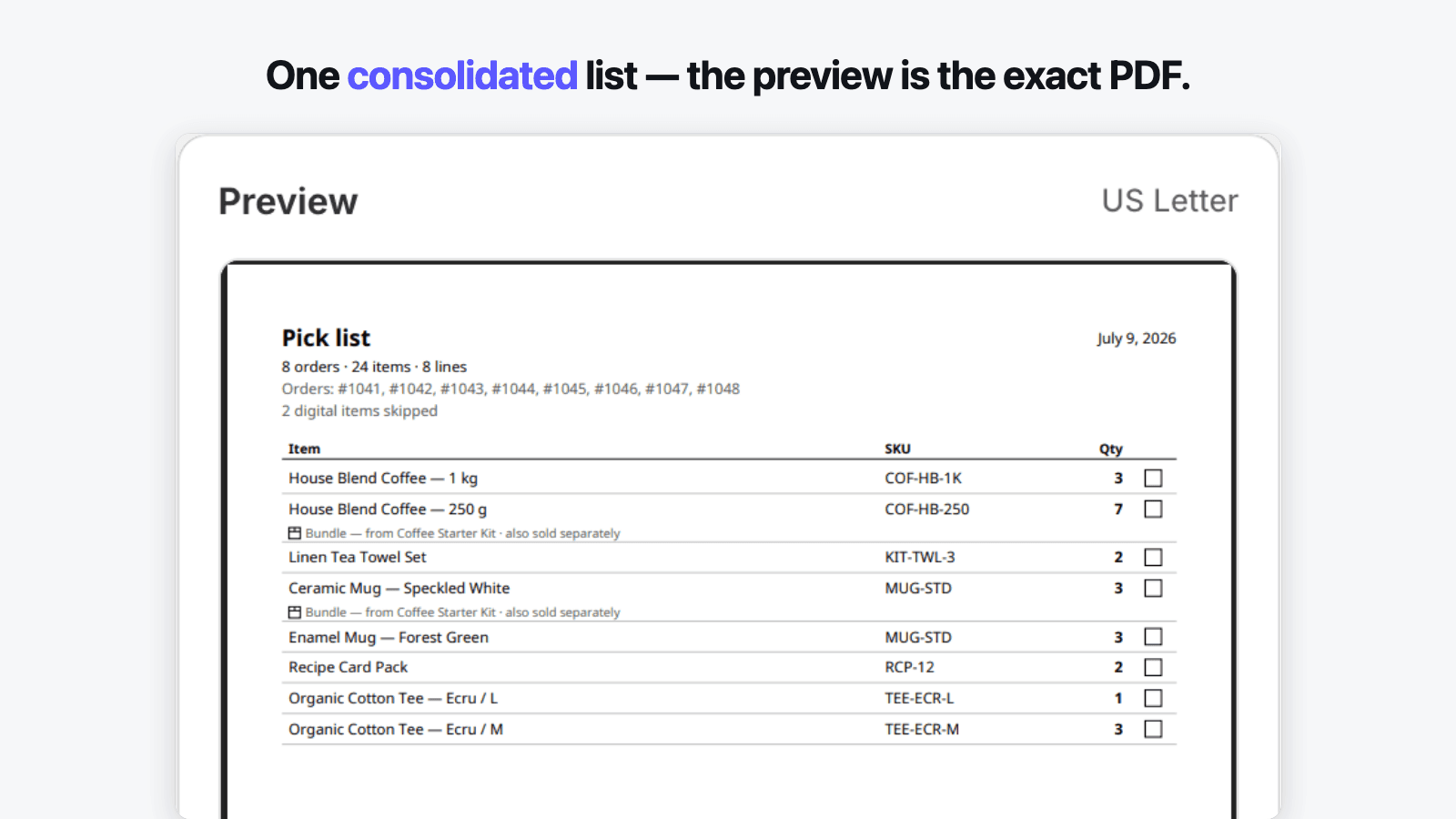
Lines come out in the order you work in. Sort by SKU or product title on any plan, or by bin location or vendor with group headers and subtotals — bins ordered naturally, so A2 comes before A10 and your aisles stay in sequence. Native Shopify bundles are split into the components you actually take off the shelf, aggregated with the rest of the list and badged back to their parent. The preview on the right is the file you download: the same render engine, the same coordinates, the same bytes — print at 100% and the pages come out complete and in order.
A pick list needs no customer data, so the app requests none: it reads order items and quantities through two read-only scopes and never touches names, addresses, emails or phone numbers — a claim you can verify in the scopes screen at install and one enforced by tests in our build pipeline. Order data is never stored; it is fetched on demand, consolidated in memory, rendered, and dropped. Pricing is a flat monthly quota of the pick lists you generate — not your store's order volume — that resets on its own, with a free plan that covers five lists a month so you can prove the whole flow on your own orders before paying anything.
In the admin
See it before you install it
Real screens from the app — the same workflow you get after install, from the quantity table to the sheet that comes out of your printer.
Why it exists
Problems we built against
Every problem below is a design constraint Pick Lists was built around — not an afterthought.
Order tools that print one order at a time, so a 40-order morning is 40 separate print jobs — and slips that come out shuffled or split across page breaks.
Select the orders you are picking and get one consolidated list. Quantities are totalled per item, the sort is deterministic, and pages print complete and in order.
A pick list you cannot reorder — a flat dump in catalog order that sends you back and forth across the stockroom instead of down the aisles once.
Sort by bin location, vendor or SKU, with group headers and subtotals, so lines come out in the order of your shelves — one walk, not five.
Bundles printed as a single kit line, leaving you to remember which components sit on which shelf, every time.
Native Shopify bundles are split into their components and aggregated with everything else, so the list shows what you actually pick up.
Billing indexed to your whole store's order count — charged for orders you never printed, with the plan bumping itself up automatically.
One metric only: the pick lists you generate. Consolidating 200 orders into one list costs one unit, the quota resets monthly, and the app never changes your plan on its own.
Prices that double overnight and layouts that change under your feet, taking a template that worked yesterday with them.
The preview is the exact PDF you download, layouts are versioned and never change silently, and any price change is grandfathered for existing subscribers.
Features
Everything the app does
6 capabilities, each mapped to a documented merchant pain. Nothing here is a roadmap item — every claim is tested against the app's acceptance criteria.
01
Select orders, get one consolidated list
The line items across every order you select are aggregated per item into a single list, with quantities totalled — one line is one thing to pick up, at its full quantity across the batch.
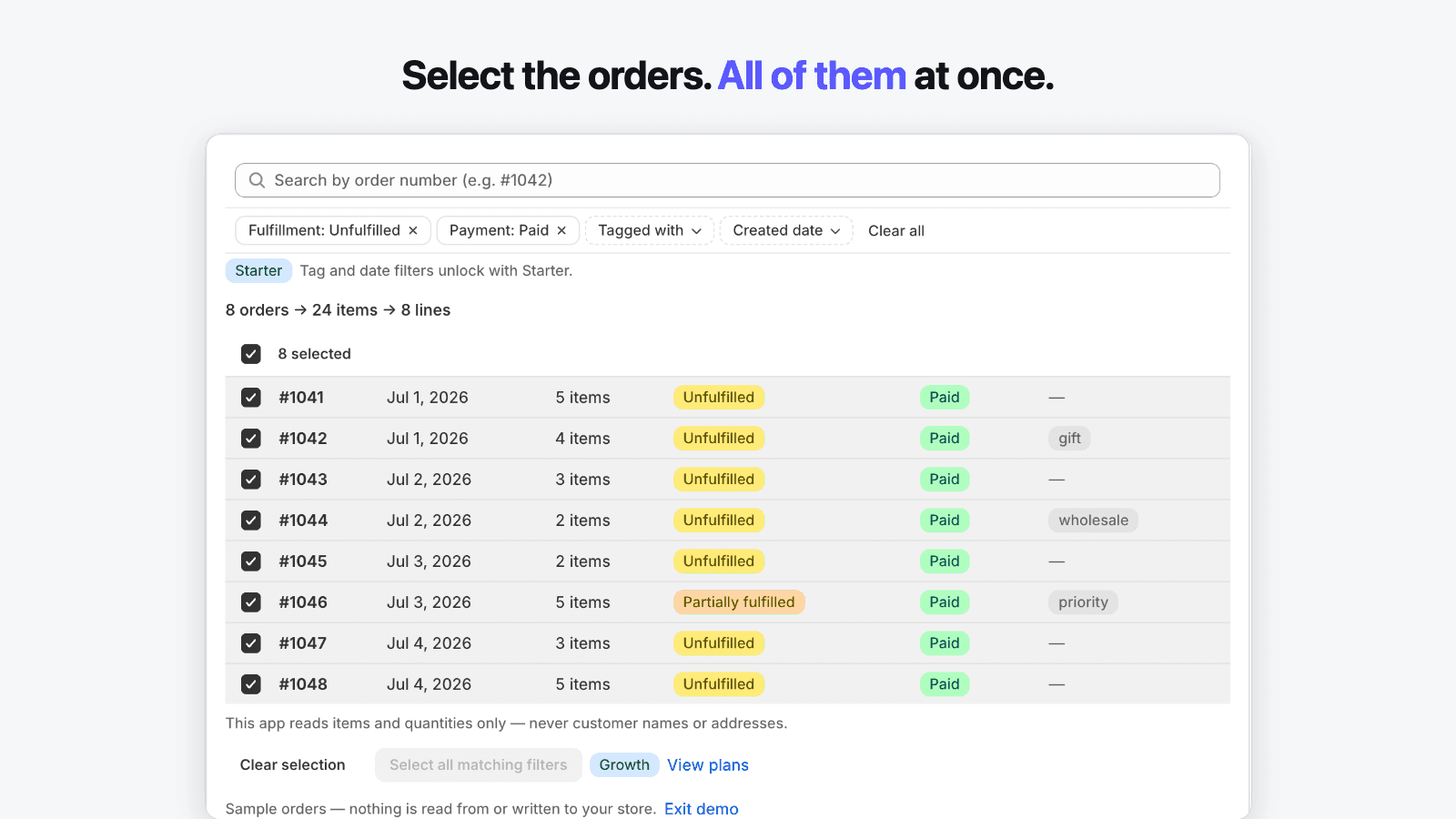
- A live counter shows the result as you select: “12 orders → 47 items → 31 lines”
- Only quantities still left to fulfil are counted — partially shipped orders are never re-picked
- One cleanly paginated PDF: no line split by a page break, headers repeated, “Page 2 of 4”
- Deterministic output — the same selection always produces the same list, to the byte
02
Sort by bin location, vendor or SKU
Choose the primary sort key and the list comes out in that order, with group headers and subtotals where they help — the aim is one walk through the stockroom, in shelf order.
- Sort by SKU or product title on every plan; by bin location or vendor on Starter
- Bin location reads a product or variant metafield you map — Shopify has no native bin field
- Natural alphanumeric order on bins (A2 before A10), so aisles stay in sequence
- Group headers carry subtotals; items with no bin or vendor land at the end, never dropped
03
Bundles split into their components
Native Shopify bundles are expanded into the components you physically take off the shelf, aggregated with the rest of the list, with a badge and a note pointing back to the parent kit.
- A component sold both on its own and inside a bundle merges onto one line — one picking motion
- Toggle “Group by bundle” for an indented view; the totals never change, only the layout
- Bundles built by apps that do not use Shopify's native bundles appear as a single line — documented, never guessed
- Component quantities come from the order data, so a bundle ordered twice lists the right counts
04
The preview is the exact PDF you download
The preview on screen is rendered by the same engine that produces the file — same coordinates, same hash — so what you check is what prints, complete and in order.
- Two versioned layouts: Compact (Item · SKU · Qty · ☐) and Detailed (+ vendor, + order numbers)
- A layout never changes silently — any rendering change ships as a new, opt-in version
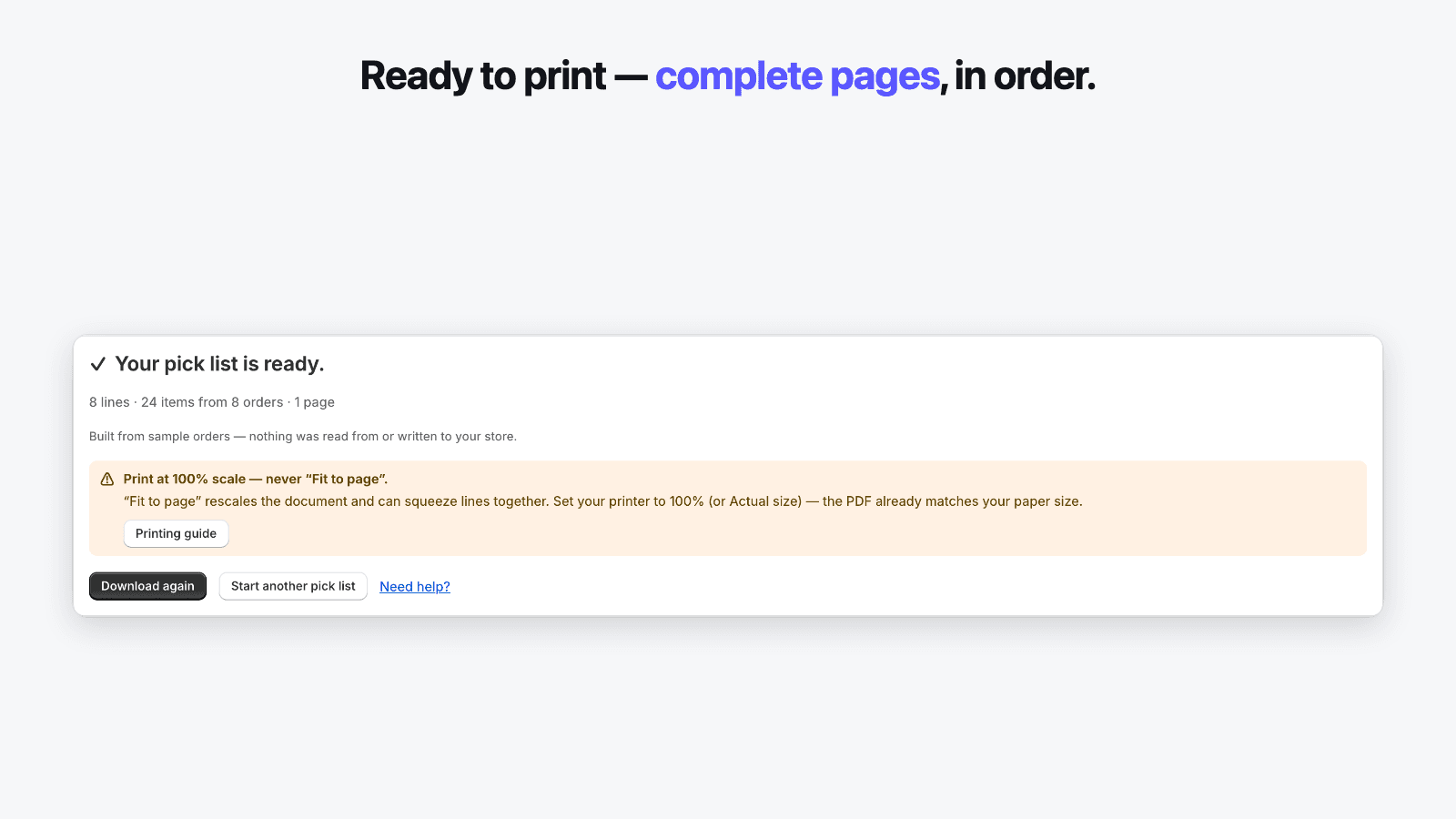
- Letter or A4 by store locale, with a “Print at 100% scale” reminder on the success screen
- Preview updates in under 300 ms as you change the selection or the sort
05
No customer data — items and quantities only
A pick list needs no customer field, so the app requests none. It reads order line items and quantities and never touches names, addresses, emails or phone numbers.
- Two read-only scopes: read_orders and read_products — no write scope at all
- No customer column anywhere in the app; the order table shows number, date, items and status
- The allowlist of order fields is checked in the build pipeline — a customer field would fail CI
- Order data is never persisted: fetched on demand, consolidated in memory, rendered, dropped
06
One monthly quota — never your order volume
Plans are metered by one thing only: the pick lists you generate. A month with no picking costs nothing extra, and the quota resets on its own.
- One PDF downloaded is one unit — consolidating 200 orders into one list still costs one
- No cap on orders per list or lines per list on any plan
- No credits and no expiring balance; the quota resets monthly and the banner shows the reset date
- The app never moves you to another plan by itself — hitting a limit is your choice to make
How it works
From start to finish in 5 steps
The whole workflow runs inside the Shopify admin — a first result typically takes a few minutes from install to download.
- 01
Select the orders you are picking
The app opens on your open orders, pre-filtered to Unfulfilled and Paid, oldest first. Tick the ones you are picking — a counter shows “12 orders → 47 items → 31 lines” as you go. No customer column appears anywhere.
- 02
Pick your sort order
Choose SKU, product, vendor or bin location. Vendor and bin group the list with headers and subtotals so the lines come out in the order of your shelves — one walk, not five.
- 03
Check the exact preview
The preview on the right is the real PDF: lines consolidated, quantities totalled, bundle components split out. It updates in under 300 ms, so what you verify on screen is byte-for-byte what you download.
- 04
Download your pick list
One click produces the PDF and a success screen with the counts — “31 lines · 47 items · 12 orders · 2 pages”. Start another list, or download this one again.
- 05
Print at 100% and walk the floor
Print at 100% scale — never “Fit to page” — and the pages come out complete and in order. Take the list to the stockroom and pick the whole batch in one pass.
Use cases
Who it's for
Built for the Shopify stores that run this workflow every day.
Maker studio fulfilling from mixed suppliers
A studio that ships from many vendors
When stock comes from a dozen vendors, a flat list means crossing the room over and over. Sorting by vendor with subtotals turns the day's orders into a per-supplier pick, and bundles are split into the components that actually sit on the bench — so a kit order does not send you hunting for its parts.
Small store picking the overnight orders
The morning batch, every day
Every morning brings a fresh pile of orders to pick. The app opens on them already filtered and sorted, and a saved preset restores last week's sort, layout and filters in two clicks. One consolidated list, one walk, and the counter confirms nothing was missed before anything prints.
Growing store with a binned stockroom
A back room organized by bin
Once stock lives in numbered bins, picking order is everything. Map the metafield that holds each product's bin and the list sorts by bin in natural order — A2 before A10 — with group headers per location. Items with no bin yet land at the end of the list instead of being quietly dropped.
Pricing
Simple plans, no credits
Free plan · from $7.99/month · 7-day free trial. One monthly quota that resets on its own — no credits to buy. Billing runs through Shopify on your regular invoice; the price shown is the price billed.
Free
$0/month
5 pick lists / month
- The complete workflow — 5 pick lists a month on your own orders
- N orders consolidated into one list, quantities totalled
- Bundles split into components, print order guaranteed
- Sort by SKU or product title
- Exact-PDF preview with Compact and Detailed layouts
Starter
Popular$7.99/month
60 pick lists / month
- Everything in Free
- Sort by bin location and vendor, with group subtotals
- Map the metafield that holds your bin locations
- Advanced filters — tags and date range
- Saved presets: your morning batch in two clicks
Growth
$14.99/month
Unlimited pick lists
- Everything in Starter
- “Select all matching orders” in one click
- Built for wave picking and seasonal peaks
- Priority same-day support
Every paid plan starts with a 7-day free trial.
FAQ
Frequently asked questions
Straight answers to the questions merchants ask before installing — including the ones about what the app deliberately does not do.
Can I build one pick list from several orders at once?
Yes — that is the core job. Select any number of orders and the app aggregates their line items into a single list, with the quantity for each item totalled across the batch. A counter shows the result as you select (“12 orders → 47 items → 31 lines”), and the output is one cleanly paginated PDF with column headers repeated on every page and no line split across a page break.
Can I sort the list by bin location or by vendor?
Yes. Sort by SKU or product title on any plan, and by bin location or vendor on Starter and above, with group headers and subtotals. Shopify has no native bin field, so bin sorting reads a product or variant metafield you map once; bins are ordered naturally, so A2 comes before A10 and your aisles stay in sequence. Items with no bin or vendor are grouped at the end of the list rather than dropped.
How does it handle product bundles?
Bundles built with Shopify's native bundles are split into their components automatically, so the list shows what you physically take off the shelf, aggregated with everything else. A “Group by bundle” toggle shows the components indented under their parent without changing any totals. Bundles created by apps that do not use Shopify's native bundles can appear as a single line — the app renders what the order exposes and says so, rather than guessing.
What happens to digital products and gift cards?
Items that do not ship — gift cards, downloads, anything marked as not requiring shipping — are left off the pick list by default, with a quiet note (“2 digital items skipped”). There is nothing to pick for them, so they do not clutter the walk. A toggle lets you include them if you want them on the list anyway.
What order data does the app read?
Items and quantities only — product titles, variants, SKUs, vendors, quantities, and the order's number, date, tags and fulfillment/payment status, plus the bin metafield you choose to map. It never reads or stores customer names, addresses, emails or phone numbers, because a pick list does not need them. This is enforced by automated tests in our build pipeline: any change that tried to fetch a customer field would fail before it could ship. The two scopes are read_orders and read_products; there is no write scope.
Is the quota based on my store's order volume?
No. The only thing metered is the number of pick lists you generate — one downloaded PDF is one unit. Consolidating 200 orders into a single list costs one unit, there is no cap on orders or lines per list, and a month where you do not pick costs nothing extra. The quota resets each month, there are no credits to expire, and the app never moves you to a different plan on its own.
My pages print in the wrong order or do not line up. What do I do?
Print at 100% scale — never “Fit to page” or “Shrink to fit”. The PDF already embeds the exact page size of your paper, so at 100% the pages come out complete and in the order the list defines. The success screen shows this reminder every time, and because the sort is deterministic, the same selection always produces the same pages in the same order.
Can I make a pick list from orders older than 60 days?
No — the app works with orders from the last 60 days. A pick list is for current fulfillment, and keeping the window short is part of why the app reads so little data (it requests read_orders, not the broader all-orders scope). If you need to reprint documents for much older orders, that is the job of an order-printer app, not a pick list.
Does it print packing slips or shipping labels?
No, and we say so upfront rather than let you find out after installing. This app builds pick lists only and reads no customer data — no names or addresses, ever. Packing slips need address fields and shipping labels need a carrier; both are different jobs. Keeping the scope to picking is what lets the app stay fast and request so little access.
What does the Free plan include?
The complete picking workflow, limited to 5 pick lists a month: consolidation with totalled quantities, bundles split into components, SKU and product sorting, and the exact-PDF preview with both layouts. It exists so you can prove the whole flow on your own orders before paying. Bin and vendor sorting, saved presets and advanced filters are on Starter; the 7-day trial lets you try them first.
Guides
Guides for Pick Lists
Step-by-step walkthroughs and troubleshooting for Pick Lists — useful whether or not you use the app.
Try Solvi Pick Lists on your store
Free plan included — verify print quality on your own printer before paying anything. Paid plans start with a 7-day free trial.