
Solvi Barcode Labels
Print barcode labels right the first time: unique codes, true-size sheets, ready in minutes.
Overview
What Barcode Labels does
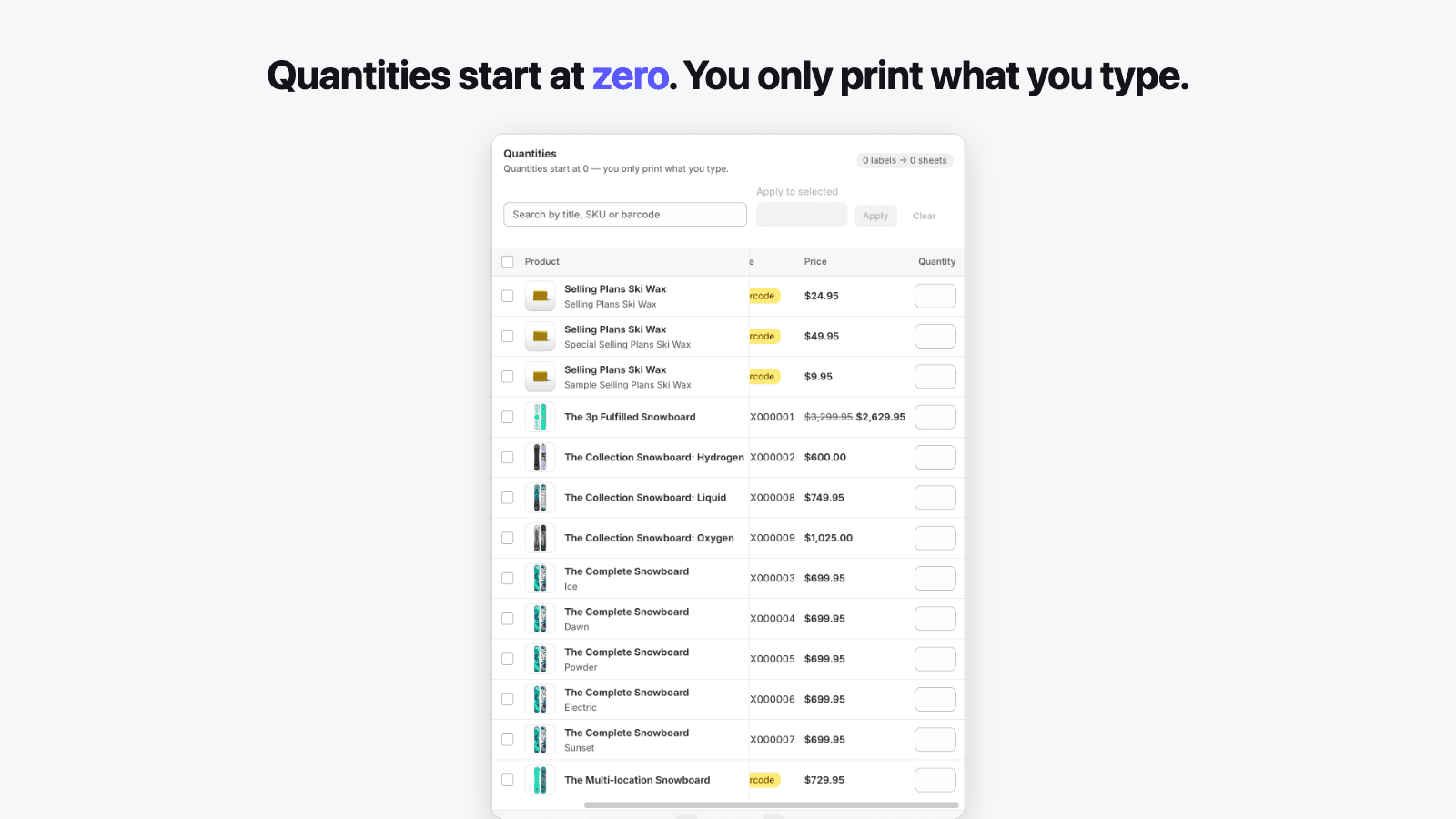
Solvi Barcode Labels creates unique barcodes for your Shopify products and prints them on sheets that match your labels. It lives inside the Shopify admin and does one job: turn the products you pick into a printable PDF at the exact dimensions of your label media, so the sheet that comes out of your printer is the sheet you saw on screen. Quantities start at zero and can be set in bulk, which means you only ever print what you type — never one label per product by default.
Pick a preset for Avery, Dymo, Zebra or Brother media, or enter your own label dimensions with live geometric validation. Each label can carry the product title, price, compare-at price, SKU and variant options, with the currency symbol placed correctly for your region — 12,90 € in France, $12.90 in the US, ¥1290 in Japan. Variants without a barcode get unique Code 128 codes generated sequentially per shop, checked against your whole catalog before they are written, and saved straight to your variants in Shopify so they can never disappear or collide.
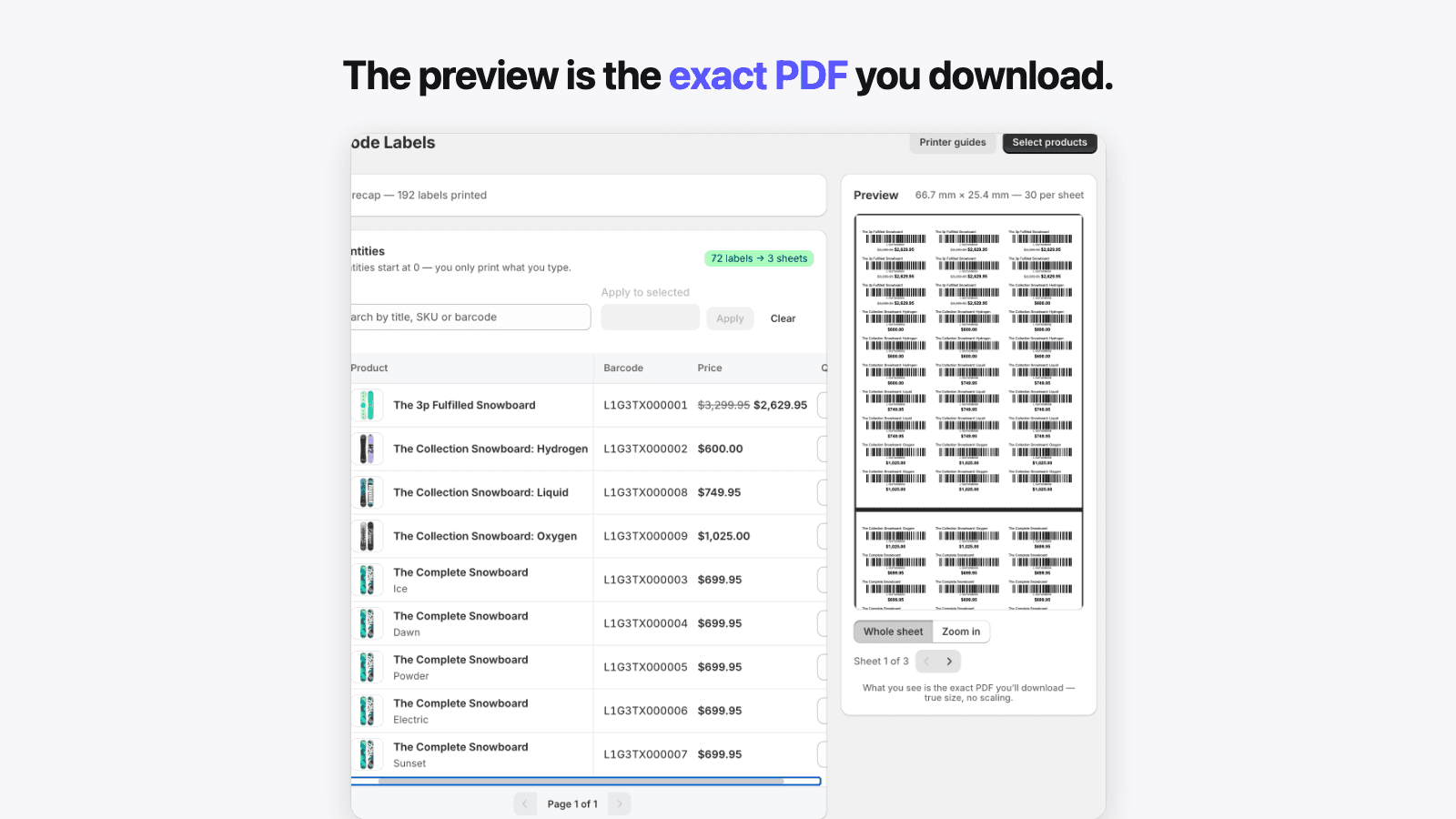
The preview is not an approximation: it is rendered by the same engine that produces the file you download, so what you check on screen is what prints. The PDF embeds the true page size of your media — print at 100% scale and the sheet lines up. Pricing is a flat monthly quota that resets on its own: no label credits, no balance that melts away when you click print, and a free plan that covers one full Avery 5160 sheet a month so you can verify print quality on your own printer before paying anything.
In the admin
See it before you install it
Real screens from the app — the same workflow you get after install, from the quantity table to the sheet that comes out of your printer.
Why it exists
Problems we built against
Every problem below is a design constraint Barcode Labels was built around — not an afterthought.
Barcode apps that default every product to one label, so each print run starts with re-typing dozens of quantities.
Quantities always start at zero. You type (or bulk-apply) exactly what this restock needs, and lines left at zero never reach the PDF.
Previews that look fine on screen while the printed sheet comes out shifted, stretched or unscannable.
The preview and the download come from the same render, with the same coordinates. Print the PDF at 100% scale and the sheet matches what you checked.
Duplicate barcodes generated across the catalog, and codes that vanish between generation and printing.
Codes are generated from a per-shop transactional sequence, verified against every barcode in your catalog, and written to your Shopify variants before anything prints.
Label credits that are deducted the moment you hit print, on top of the subscription you already pay.
There are no credits on any plan. Each plan has one monthly label quota that resets by itself — nothing to buy, no balance to watch.
Fixed label formats that ignore your media, your currency and your sale pricing.
Presets for Avery, Dymo, Zebra and Brother plus fully custom dimensions, with locale-correct currency placement and an optional crossed-out compare-at price.
Features
Everything the app does
6 capabilities, each mapped to a documented merchant pain. Nothing here is a roadmap item — every claim is tested against the app's acceptance criteria.
01
Quantities start at zero
Set amounts in bulk and print only what you need. The default is not configurable because it is simply correct: no sheet can exist without your explicit input.
- Bulk entry: select rows and apply one quantity to all of them at once
- Keyboard-first table — Enter jumps to the next quantity field
- Live counter shows the result as you type: “34 labels → 2 sheets”
- Rows left at zero are ignored — they never appear in the PDF
02
Unique barcodes saved to your variants
Missing codes are detected automatically and generated as Code 128, checked against your whole catalog before writing so duplicates are structurally impossible.
- Sequential per-shop counter with a transactional uniqueness guarantee
- Codes are written to Shopify before printing — they cannot disappear
- Existing UPC/EAN codes are never modified or silently overwritten
- Pre-existing catalog duplicates are flagged with a one-click fix you confirm
03
Presets for Avery, Dymo, Zebra and Brother media
Pick a reference and the sheet layout, margins and page size are set from the manufacturer’s spec — or enter custom label dimensions with live validation.
- Each preset shows its real dimensions, e.g. “Avery 5160 — 2.625″ × 1″, 30 per sheet”
- Custom width, height, margins, gutters, columns and rows (Starter)
- Impossible geometry is blocked at input with a suggested fix — never at download
- Default preset follows your store locale: Avery 5160 (US Letter) or L7160 (A4)
04
Price, compare-at price, SKU and variant options
Label fields are formatted from your store’s locale and currency — never hand-assembled — so the symbol sits on the correct side with the correct decimals.
- 12,90 € in France, $12.90 in the US, ¥1290 in Japan — CLDR formatting
- Compare-at price rendered crossed out next to the sale price (Starter)
- Toggle title, variant, SKU and price line by line
- Long titles truncate cleanly — nothing ever pushes the barcode off the label
05
The preview is the exact PDF you download
One render engine produces both the on-screen preview and the file you print, at true size. Print at 100% and the sheet comes out as expected.
- Preview updates in under 300 ms as you type, with sheet and label zoom
- The PDF embeds the exact page size of your media — Letter, A4 or roll
- Start at any label position to reuse a partially used sheet
- Built-in printer guides for Dymo, Brother, Zebra and laser/inkjet
06
No label credits — a monthly quota that resets
One limit metric on every plan: labels per month. The quota resets on its own, and hitting it never destroys your work or locks you out of the app.
- No credit packs, no expiring balance, no per-click deductions
- Hitting a limit keeps your composition intact — upgrade or trim, your choice
- After a trial ends the app falls back to Free — it is never fully blocked
- The price shown on the plan page is the price billed
How it works
From start to finish in 5 steps
The whole workflow runs inside the Shopify admin — a first result typically takes a few minutes from install to download.
- 01
Pick products
Select products, collections or individual variants with Shopify’s native picker. No re-typing — the app reads your titles, prices, SKUs and existing barcodes.
- 02
Set quantities — they start at 0
Type quantities line by line or apply one number to a whole selection. A live counter shows exactly how many labels and sheets you are about to produce.
- 03
Generate unique codes
Variants without a barcode are flagged. One click generates unique Code 128 codes, checked against your entire catalog and saved to your variants in Shopify.
- 04
Check the exact preview
The preview is the actual PDF, rendered at true size with your media’s dimensions. What you verify on screen is byte-for-byte what you download.
- 05
Download and print at 100%
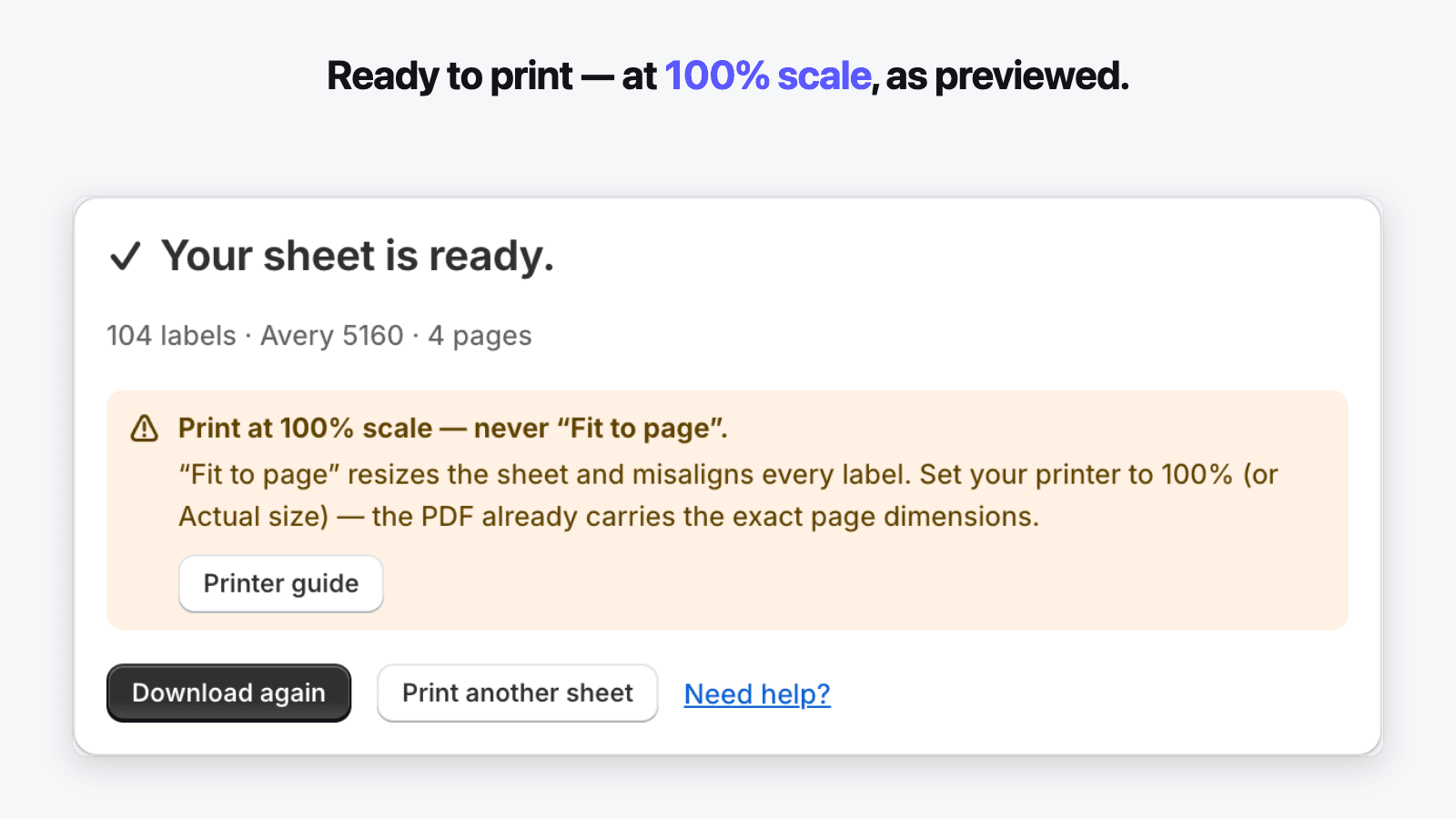
Download the PDF and print at 100% scale — never “Fit to page”. The success screen links the printer guide for your media family.
Use cases
Who it's for
Built for the Shopify stores that run this workflow every day.
Jewelry store owner printing small-format price tags
Price tags for a jewelry counter
Small labels are the hardest to get right: a code below 10 mm may not scan, and a preview that lies wastes an entire sheet of tags. The app warns when a size risks scannability, renders at exact dimensions for jewelry tag media, and puts price and SKU on the tag with the correct currency format.
Apparel retailer using Shopify POS at checkout
Clothing boutique scanning at the register
Every variant — size and color — needs its own scannable code at the register. Missing codes are generated uniquely across the whole catalog and saved to the variants, so what the label printer produces is what the POS scanner reads. Compare-at pricing puts the original price crossed out next to the sale price during markdowns.
Multi-thousand-variant store receiving stock every week
Weekly restocks on a large catalog
Restock day means dozens of products at different quantities. Quantities start at zero and bulk entry fills a receiving list in seconds; saved templates keep your media settings from last week. On Growth, one bulk operation generates and prints across the entire catalog.
Pricing
Simple plans, no credits
Free plan · from $5.99/month · 7-day free trial. One monthly quota that resets on its own — no credits to buy. Billing runs through Shopify on your regular invoice; the price shown is the price billed.
Free
$0/month
30 labels / month
- Complete workflow — one Avery 5160 sheet a month
- Quantities start at zero, with bulk entry
- Unique barcode generation, catalog-wide checks
- All Avery, Dymo, Zebra and Brother presets
- Exact-PDF preview and printer guides
Starter
Popular$5.99/month
1,000 labels / month
- Everything in Free
- Custom label dimensions and multi-line fields
- Compare-at (sale) price on labels
- Saved, named label templates
- Covers a typical weekly restock
Growth
$21.99/month
Unlimited labels
- Everything in Starter
- Whole-catalog generation and printing in one bulk operation
- Built for multi-thousand-variant catalogs
- Priority same-day support
Every paid plan starts with a 7-day free trial.
FAQ
Frequently asked questions
Straight answers to the questions merchants ask before installing — including the ones about what the app deliberately does not do.
Does it work with Avery, Dymo, Zebra and Brother labels?
Yes. The app ships presets for Avery sheets and Dymo, Zebra and Brother rolls, each built from the manufacturer’s real dimensions — layout, margins and page size included. Every preset shows its measurements before you commit, and if your reference is missing you can enter custom dimensions from the label box (Starter) or email us the reference; presets are added weekly.
My printed sheet doesn’t line up with the labels. What do I do?
Nine times out of ten the printer dialog is scaling the PDF. Print at 100% scale — never “Fit to page” or “Shrink to fit” — and the sheet will match the preview exactly, because the PDF already embeds the true page size of your media. The app shows this reminder on the success screen and includes a calibration guide for Dymo, Brother, Zebra and laser printers.
Can I print different quantities for different products?
Yes — that is the core workflow. Every quantity starts at zero, and you type what each variant needs, line by line with keyboard navigation or in bulk by selecting rows and applying one number. A live counter shows the resulting label and sheet count, and any line left at zero simply never prints.
How does the app prevent duplicate barcodes?
Generated codes come from a sequential per-shop counter backed by a transactional database constraint, so two people generating at the same time cannot collide. Before any code is written, it is verified against every barcode already in your catalog. The app also detects duplicates that existed before you installed it and offers a confirmed, one-click fix — it never rewrites your codes automatically.
Can I keep the UPC/EAN codes my products already have?
Yes. Existing codes are never modified or overwritten — generation only targets variants whose barcode field is empty. Valid 12- or 13-digit codes are rendered in proper UPC-A or EAN-13 symbology; anything else is rendered as Code 128 exactly as stored. The app flags a code only when it looks like a UPC/EAN but has a broken check digit.
What does the Free plan include?
The full workflow, limited to 30 labels per month — exactly one Avery 5160 sheet. That includes zero-default quantities with bulk entry, unique code generation, every Avery/Dymo/Zebra/Brother preset, localized currency and the exact-PDF preview with printer guides. It exists so you can verify print quality on your own printer before paying anything.
Are there label credits or hidden fees?
No. There are no credits on any plan and nothing is deducted when you click print. Each plan has a single monthly label quota that resets on its own, billing goes through Shopify on your regular invoice, and the price shown on the plan page is the price billed. Paid plans start with a 7-day free trial.
Can labels show a sale price with the original price crossed out?
Yes, on Starter and above. When a variant’s compare-at price is higher than its current price, the label shows the compare-at value struck through next to the sale price. Currency formatting follows your store’s locale in all cases — symbol position, decimal separator and decimal count included — so 12,90 € and $12.90 both come out right.
Does it print from Shopify POS or purchase orders?
No — and we say so upfront rather than let you find out after installing. The app runs in the Shopify admin only and prints from your product catalog. POS and purchase-order printing are on our radar but not promised; keeping the scope narrow is what keeps the one job reliable.
What store data does the app access?
Products only. It uses two scopes: read_products to read titles, SKUs, prices and barcodes, and write_products for a single purpose — saving generated barcodes to your variants. It never reads customers, orders or payment data, and it stores no customer personal data at all. The full details are in the privacy policy.
Guides
Guides for Barcode Labels
Step-by-step walkthroughs and troubleshooting for Barcode Labels — useful whether or not you use the app.
Try Solvi Barcode Labels on your store
Free plan included — verify print quality on your own printer before paying anything. Paid plans start with a 7-day free trial.