
Solvi Restock
Know what to reorder today and how much — then turn the answer into a ready-to-send purchase order.
Overview
What Restock does
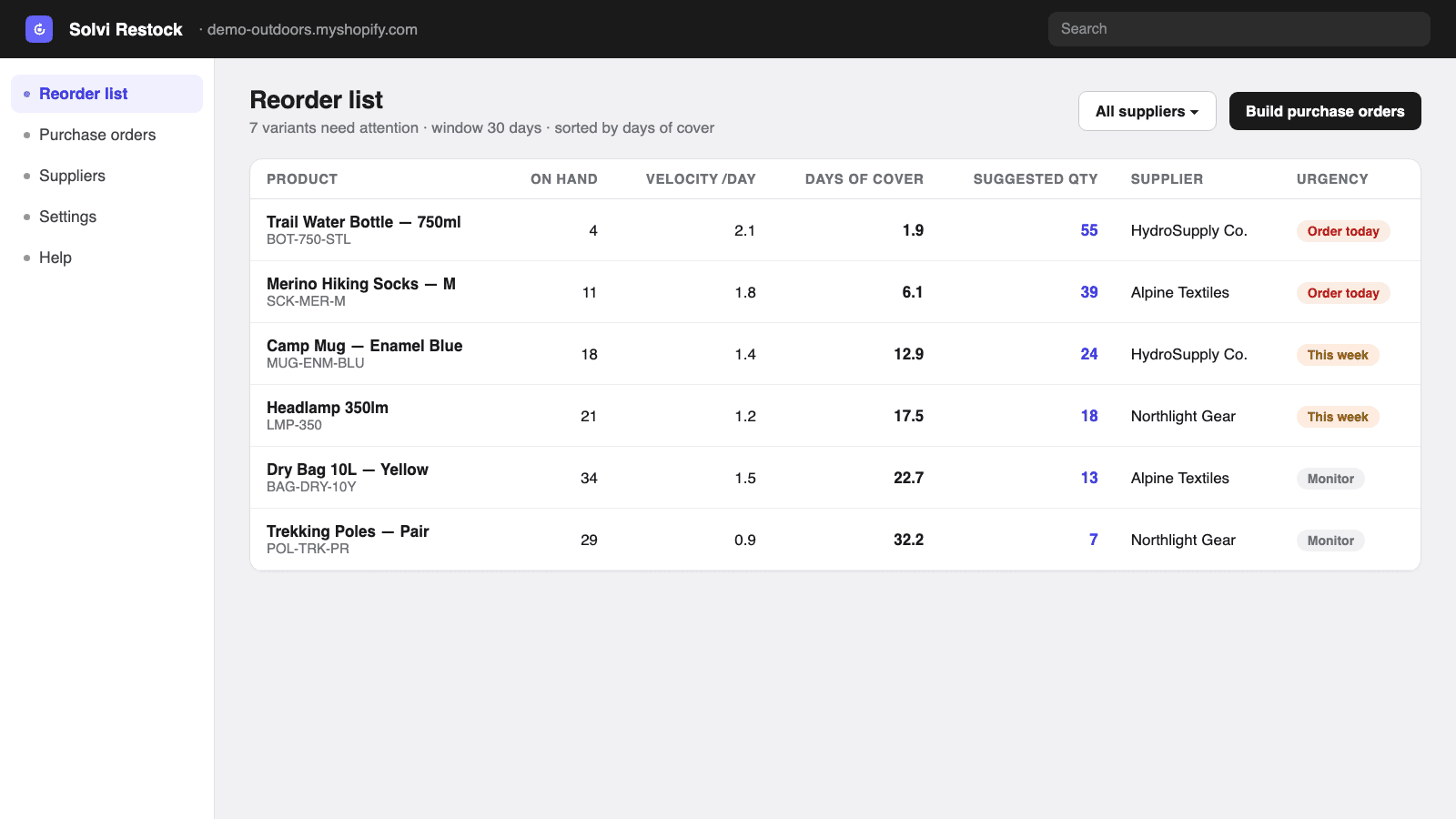
Solvi Restock lives inside the Shopify admin and does one job: tell you what to reorder before it runs out. On landing you get a prioritized reorder list — for each variant, the current stock, its sales velocity over your chosen window, the days of cover left, and a suggested order quantity, sorted so the soonest stock-out sits on top. No spreadsheet, no export, no setup marathon: the list is there from the first minute, computed from your recent orders and stock.
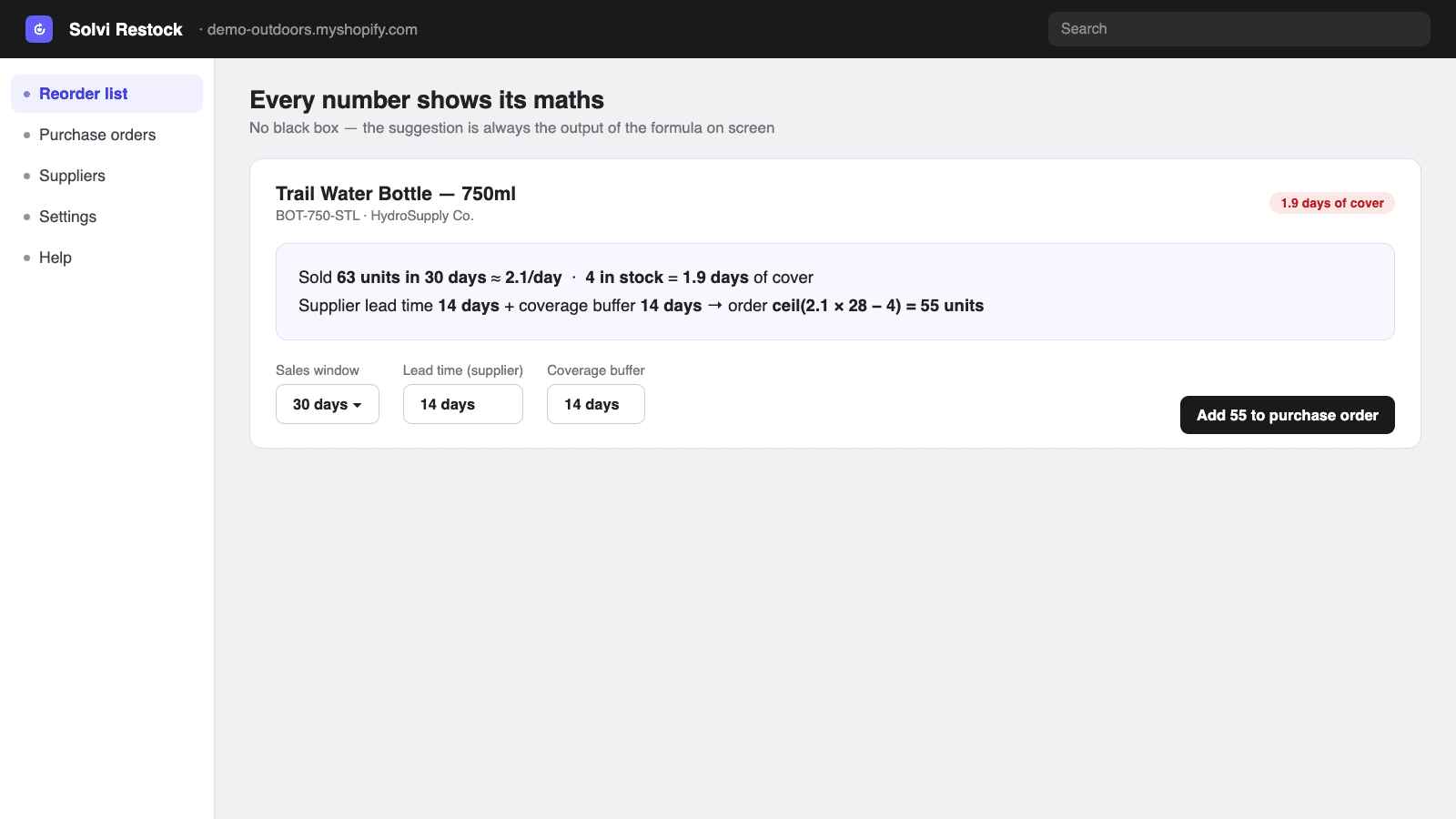
Every suggestion shows its reasoning in plain words — “sold 30 in 30 days ≈ 1/day; 5 in stock = 5 days of cover; 14-day supplier lead time → order 20 to cover 3 weeks.” The displayed number is always the output of the displayed formula, and editing the window, lead time or coverage buffer recomputes it live. When you are ready, the list grouped by supplier becomes a purchase order in one click: pre-filled quantities and purchase costs, editable lines, draft → sent → received statuses, and a clean, deterministic PDF to download or email to your supplier.
It is deliberately not an ERP: no AI black box, no inventory mirror, no 12-month contract. It reads order line items, quantities, stock and costs through read-only scopes — never a customer name, email or address, a claim you can verify on the permissions screen at install. Pricing follows the same philosophy: a real free plan, then flat monthly plans gated by features — never by your order volume, and never a per-backorder fee. Prices are grandfathered for existing subscribers.
In the admin
See it before you install it
Real screens from the app — the same workflow you get after install, from the quantity table to the sheet that comes out of your printer.
Why it exists
Problems we built against
Every problem below is a design constraint Restock was built around — not an afterthought.
Stocky shuts down on August 31, 2026 — and Shopify's suggested replacement (admin inventory) has no purchase orders, no suppliers and no reorder suggestions.
Solvi Restock covers the daily Stocky job — reorder list, suppliers, purchase orders with PDF — with a free plan to verify it on your own store before the deadline.
The established alternatives are demand-planning platforms at $100–330 a month, often with annual contracts — an ERP price for what is, day to day, a reordering task.
A reorder assistant at a reorder-assistant price: free to start, $19/month for unlimited purchase orders and suppliers. No contract, no onboarding project.
AI forecasting tools hand you a number you cannot check — and when it is wrong, you find out after the stock-out.
Every suggestion shows its math in plain words, and the number on screen is always the output of the formula on screen. Change the inputs, watch it recompute.
Apps billed on order volume or per-backorder fees — costs that scale with your sales even when your usage does not.
Plans are gated by features only. Order volume is never metered, there is no per-backorder fee, and existing subscribers keep their price.
Inventory tools that demand write access to everything and mirror your whole store before showing a single suggestion.
Read-only scopes, no customer fields, no inventory mirror: stock is read at compute time and nothing sensitive is stored. The permissions screen proves it at install.
Features
Everything the app does
6 capabilities, each mapped to a documented merchant pain. Nothing here is a roadmap item — every claim is tested against the app's acceptance criteria.
01
The reorder list — sorted by urgency
Landing screen = the answer: every variant about to run out, with current stock, velocity, days of cover and a suggested quantity, soonest stock-out on top.
- Velocity = units sold over your window (default 30 days) ÷ days — deterministic, no black box
- Days of cover = current stock ÷ velocity; the sort key that puts urgency on top
- Filter by supplier or vendor to plan one order at a time
- Archived products and zero-velocity items with stock are excluded from the noise
02
Visible math on every suggestion
Each suggested quantity explains itself in one plain sentence — the exact inputs and the exact formula, recomputed live when you change them.
- suggested = max(0, ceil(velocity × (lead time + coverage) − stock)) — shown, not hidden
- Sales window, lead time and coverage buffer are editable per shop, supplier or variant
- The displayed number is always the output of the displayed formula — tested, not promised
- Trust the number or tweak it — either way you see why
03
One click from list to purchase order
The reorder list grouped by supplier becomes a pre-filled draft PO: suggested quantities, purchase costs, editable lines, running totals.
- Add, edit or remove lines before sending — the suggestion is a starting point, not a decision
- Statuses that match reality: draft → sent → partially received → received/closed
- Purchase costs default to Shopify's unit cost when present, editable when not
- A monthly recap shows what you reordered — 12 POs, 340 units — at a glance
04
A clean PDF your supplier can act on
Every purchase order renders to a professional PDF — your details, the supplier's, SKU lines, quantities, costs and totals — to download or email.
- Deterministic rendering: the same PO always produces the same PDF, byte for byte
- Layouts are versioned — a document that worked yesterday never changes under your feet
- The supplier's address on the document — never a customer's
- Download instantly or email it to the supplier from the app
05
Suppliers, lead times and costs in one place
Set each supplier's lead time and each variant's purchase cost once — every suggestion uses them from then on.
- Supplier records: name, email, address for the PO document
- Lead time and coverage buffer per supplier or per variant, with shop-level defaults
- CSV import for costs and lead times when you already have them in a sheet
- Purchase costs pre-filled from Shopify's inventory unit cost where available
06
Low-stock digest — the morning ritual
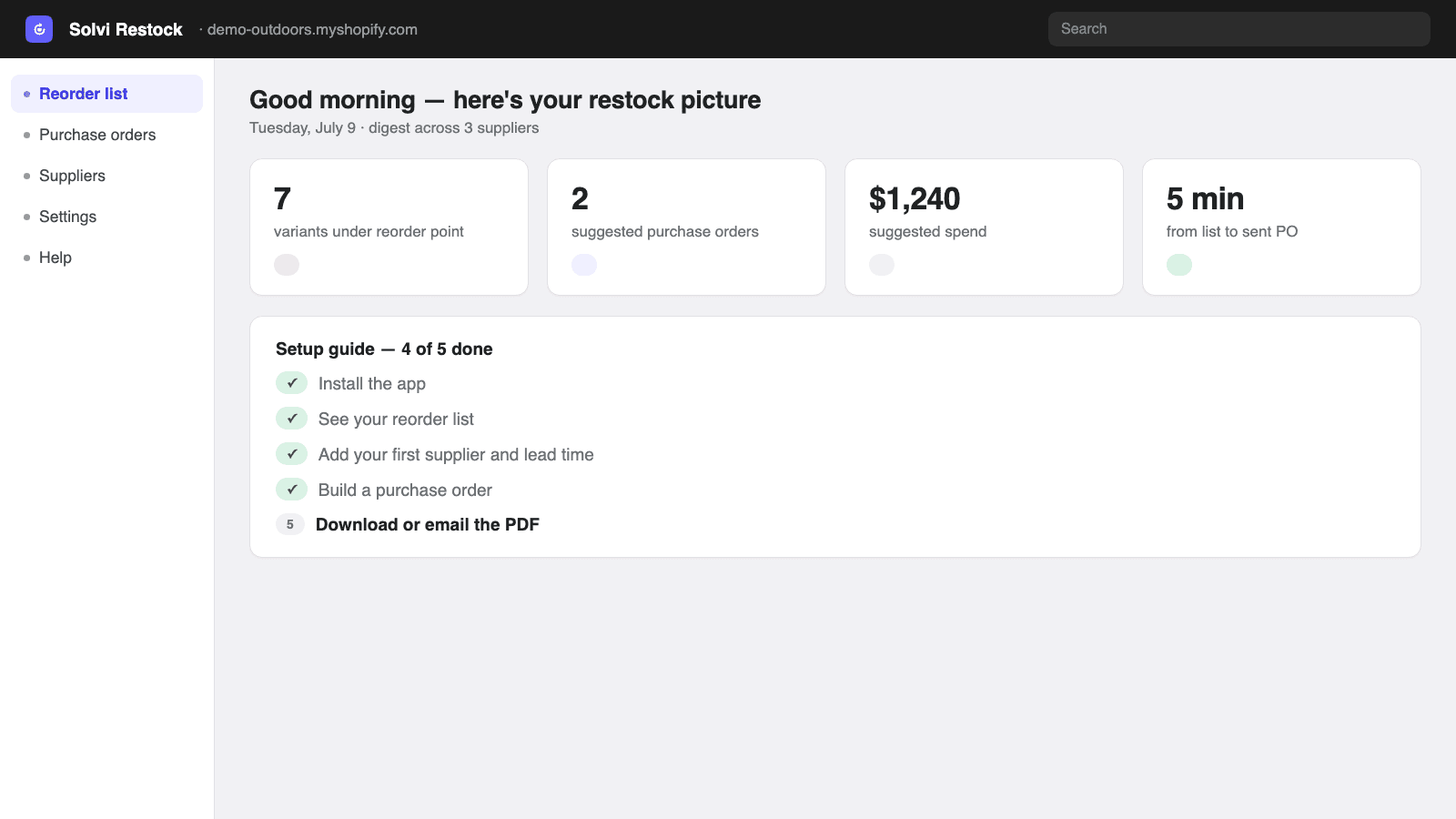
A daily summary of how many products sit under their reorder point, so the day starts with the answer instead of the question.
- “N products under their reorder point” with the suggested spend, in-app
- From digest to sent purchase order in under five minutes
- A 5-step setup guide gets a new store from install to first PO in one sitting
- Works from day one — a demo dataset shows the flow even before sales history accrues
How it works
From start to finish in 5 steps
The whole workflow runs inside the Shopify admin — a first result typically takes a few minutes from install to download.
- 01
Install and see your reorder list immediately
Solvi Restock reads your recent orders and current stock and shows the prioritized list right away, with sensible defaults (30-day window, 14-day lead time, 14-day coverage). No setup before the first insight.
- 02
Check the math on any suggestion
Open any line to see its reasoning in plain words. Adjust the sales window or coverage buffer if your business rhythm differs — everything recomputes instantly.
- 03
Add your suppliers and lead times
Create supplier records and set their lead times — or import costs and lead times from CSV. Suggestions sharpen as the inputs get real.
- 04
Build the purchase order in one click
Filter the list by supplier and build a pre-filled draft PO: suggested quantities, purchase costs, editable lines. Review, adjust, done.
- 05
Download or email the PDF, then track it
Send the clean PDF to your supplier and track the PO through sent, partially received and received — so tomorrow's list already knows what is on the way.
Use cases
Who it's for
Built for the Shopify stores that run this workflow every day.
Ex-Stocky merchant
Replace Stocky before August 31
Stocky dies on August 31, 2026, and its supplier data cannot even be exported. Recreate suppliers and lead times here in an afternoon, and keep the daily reorder-and-PO ritual without adopting an ERP.
500-SKU store
The Monday morning reorder
Open the app, read the digest, check the math on the urgent lines, send two purchase orders — the weekly reorder drops from a spreadsheet morning to fifteen minutes.
Multi-supplier shop
A handful of suppliers, each their own rhythm
A 10-day domestic supplier and a 45-day overseas one need different buffers. Per-supplier lead times mean each line's suggestion respects who actually ships it.
Pricing
Simple plans, no credits
Free plan · from $19/month · 7-day free trial. One monthly quota that resets on its own — no credits to buy. Billing runs through Shopify on your regular invoice; the price shown is the price billed.
Free
$0/month
3 purchase orders / month
- Full reorder list with visible math
- Low-stock digest
- 1 supplier · PO PDFs included
- Enough to verify the suggestions on your own store
Starter
Popular$19/month
Unlimited POs & suppliers
- Unlimited purchase orders and suppliers
- Purchase-cost tracking on every line
- Receive against POs — full or partial
- CSV import of costs and lead times
Growth
$39/month
Everything, multi-location
- Multi-location receiving
- CSV export of POs and history — your data stays yours
- Priority same-day support
- Everything in Starter
Every paid plan starts with a 7-day free trial.
FAQ
Frequently asked questions
Straight answers to the questions merchants ask before installing — including the ones about what the app deliberately does not do.
Is Solvi Restock a replacement for Stocky?
For the daily job most merchants used Stocky for — seeing what needs reordering and turning it into supplier purchase orders — yes. It deliberately does not rebuild Stocky's stocktakes or its POS Pro coupling. Stocky shuts down on August 31, 2026, and supplier data cannot be exported from it, so suppliers need to be recreated wherever you land; here that is an afternoon of setup.
How is the suggested quantity calculated?
In the open: velocity = units sold over your sales window ÷ days; days of cover = current stock ÷ velocity; suggested = max(0, ceil(velocity × (lead time + coverage buffer) − stock)). Every line shows this reasoning in plain words, and the number on screen is always the output of that formula with your inputs.
Is this an AI forecasting tool?
No — deliberately. AI demand planning hands you a number you cannot verify. Solvi Restock uses transparent velocity math you can check, tune and trust. If you need probabilistic 12-month forecasts across thousands of SKUs, a demand-planning platform is the right tool; this is the reorder assistant for everyone who does not.
What Shopify permissions does it need?
Read-only scopes: read_orders, read_products and read_inventory. It reads line items, quantities, variants, stock and costs — never customer names, emails, phone numbers or addresses. Our build pipeline fails if any query touches a customer field, and you can verify the scopes on the permissions screen at install.
Does it store my inventory?
No. Stock levels are read from Shopify at computation time and never persisted — there is no inventory mirror to drift out of sync. The app stores your suppliers, reorder settings, purchase orders and a short-lived cache of sales counts. That's it.
What does the free plan include?
The full reorder list with visible math, the low-stock digest, one supplier, and 3 purchase orders per month with PDF download. It is enough to run a real reorder cycle on your own store and check our suggestions against your instincts before paying anything.
Will my price increase as my store grows?
No. Plans are gated by features, never by order volume, and there are no per-backorder fees — the two pricing models merchants hate most in this category. Your sales can triple and your bill stays the same, and existing subscribers keep their price if list prices ever change.
Where do purchase costs come from?
From Shopify's inventory unit cost when you have it filled in, automatically. Where it is missing, set the cost on the variant or import costs and lead times from a CSV — the PO totals and suggestions use them from then on.
Can I email a purchase order to my supplier?
Yes — every PO renders to a clean, deterministic PDF (your details, the supplier's, SKU lines, quantities, costs, totals) that you can download or email directly. The supplier needs no account and no login; it is a document, not a portal.
Does it work with multiple locations?
The reorder math reads your stock across Shopify locations, and the Growth plan adds multi-location receiving and CSV export of your POs and history. Single-location stores get everything they need on Starter.
Guides
Guides for Restock
Step-by-step walkthroughs and troubleshooting for Restock — useful whether or not you use the app.
Try Solvi Restock on your store
Free plan included — verify print quality on your own printer before paying anything. Paid plans start with a 7-day free trial.